
Advanced Analytics and Machine Learning
In late 2025, Anthropic launched Claude in Excel. This is a sidebar that sits inside Microsoft Excel and can read, analyse, modify, and build entire workbooks (but doesn't yet make you coffee despite my repeated requests and emails to Anthropic management).
Claude in Excel: What It Actually Does
Claude in Excel is a sidebar with structural awareness of your workbook. So it looks at every tab, every formula dependency, every named range. When you ask it a question, it tries to give you cell level citations and context.
So if you ask "why did Q3 revenue drop?" you'll get something like: "Revenue decreased because customer acquisition in Inputs!D7 dropped from 150 to 120 customers, which flows through Forecast!B14 and reduces Summary!C22 by £180K, and no I can't make coffee yet."
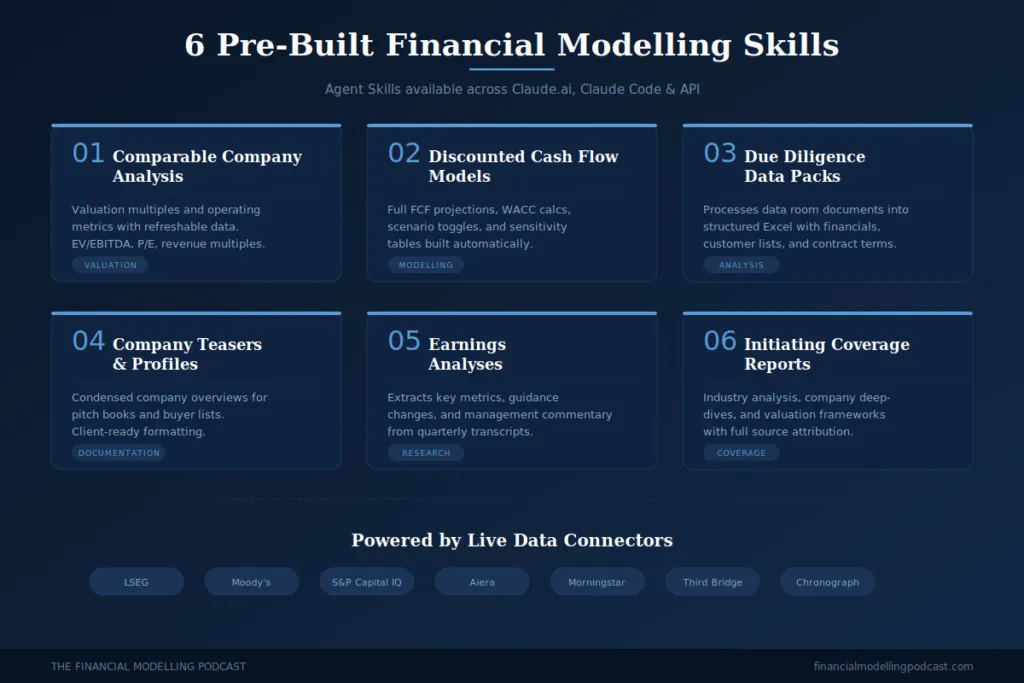
So a lot more useful than what it did previously. Below you can see the built in financial modelling skills it now has,
What it can do in practice
Explain the model. You've inherited a 47 tab monstrosity from someone who left six months ago. Instead of spending two days tracing cell references, you can ask Claude to walk you through the structure. It maps the dependencies, explains the logic, and points you to the cells that matter, provided the workbook had some structure to begin with!
Debug formulas. #REF! errors, circular references, broken VLOOKUP chains can potentially be solved when Claude traces errors to their source and explains what went wrong. It also tries to explains how to fix them.
Modify assumptions. This is the one that matters most for financial modellers. You want to test what happens if you increase revenue growth by 2%, but you don't want to break a model 5 minutes before the client meeting. Claude changes values across the entire workbook while preserving formula dependencies and relationships. Modification is explained and highlighted - but I'm still personally a bit wary of this.
Build models. Give Claude your assumptions and structure requirements, and it will create a financial model, including P&L, balance sheet and cash flow. It also does this with formula linkages. It's not going to produce a model you'd send to a client without review, but as a first draft that gets you 30-50% of the way there.
Generate documentation. The task every modeller knows they should do but never has time for. Claude can generate model documentation including calculation methodologies, assumption sources, and cell level comments explaining complex formulas. Again - review needed!
The Financial Data Connectors
Here's where it gets interesting for anyone working in investment analysis or corporate finance. Anthropic has partnered with major financial data providers and connected them directly to Claude:
- LSEG (formerly Refinitiv) for equities, fixed income, FX, and macro data
- Moody's for credit ratings, ownership data, and company financials
- S&P Capital IQ for fundamental data and analytics
- Aiera for real-time earnings call transcripts and investor event summaries
- Morningstar for fund and investment data
- Third Bridge and Chronograph for expert interviews and PE analytics
This means Claude can pull market data, reference earnings call transcripts, and cross check your assumptions against current fundamentals.
Pre-Built Financial Modelling Skills
Anthropic has also released six pre-built "Agent Skills" for financial services. These are workflows that Claude can execute:
- Comparable company analysis: valuation multiples and operating metrics that can be refreshed with updated data
- Discounted cash flow models: FCF projections, WACC calculations, scenario toggles, and sensitivity tables
- Due diligence data packs: processes data room documents into Excel outputs with financial information, customer lists, and contract terms
- Company teasers and profiles: condensed overviews for pitch books and buyer lists
- Earnings analyses: extracts key metrics, guidance changes, and management commentary from quarterly transcripts
- Initiating coverage reports: industry analysis, company deep dives, and valuation frameworks
These skills work across Claude.ai, Claude Code, and the API.
Where Claude Helps Financial Modellers
Formula optimisation. Many financial models accumulate complexity over time. Nested IF statements five layers deep, SUMPRODUCT formulas that nobody can audit, INDEX-MATCH chains that would make your head spin. Claude can potentially simplify by transforming them into cleaner, more auditable structures. Use with caution!
Model review and quality assurance beyond what our add-ins do. Claude spot potential circular reference risks, and check that your balance sheet actually balances. It won't catch everything a senior modeller would, but it catches the mechanical errors fast. For our own add-ins that provide model reviews see here.
VBA and macro development. If you need to automate repetitive tasks like formatting financial statements or importing data from external sources Claude can write VBA code. It's also adds comments which can help when someone else needs to maintain it.
Formatting. Colour coding conventions (blue for inputs, black for formulas, green for links to other sheets), consistent formula structures, separation of assumptions and calculations, naming conventions, Claude can help implement these across a workbook.
Scenario and sensitivity analysis. Claude can structure scenario analyses and populate them, leaving more time to be spent on interpreting the results.
What Claude Can't Do (Yet)
Make coffee. Besides for that, some other things below.
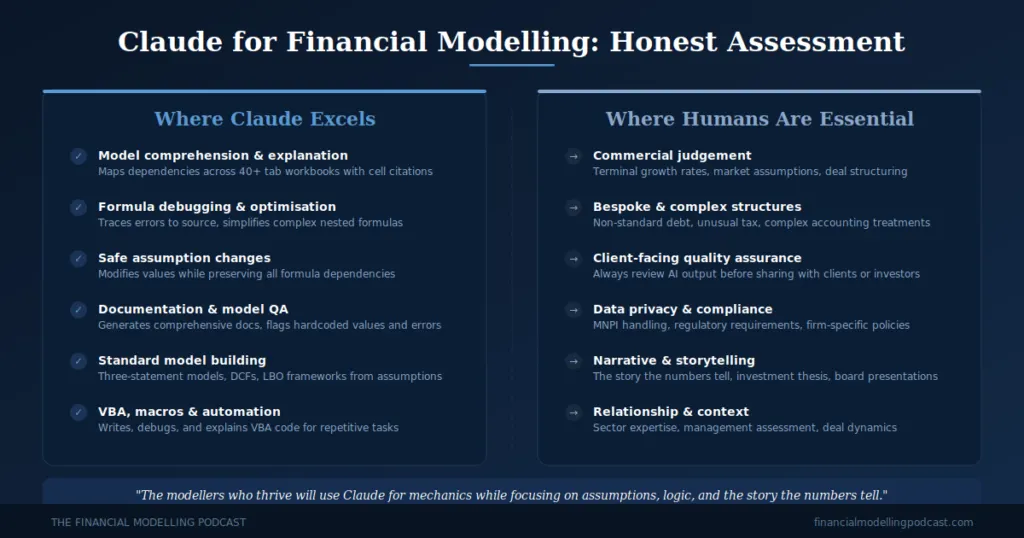
It doesn't replace judgement. Claude can build you a DCF model, but it can't tell you whether your terminal growth rate assumption is reasonable. That's still your job.
Complex models need human oversight. For straightforward structures like three statement models Claude does well. For bespoke structured finance models with debt structures or tax arrangements, you'll need to check its work carefully and potentially build your own.
It can make mistakes. Always review changes before finalising. Claude's financial reasoning is good but not infallible"
Data privacy. If you're working with material non-public information or sensitive client data, make sure you understand your firm's policies around AI tool usage.
How to Get Started
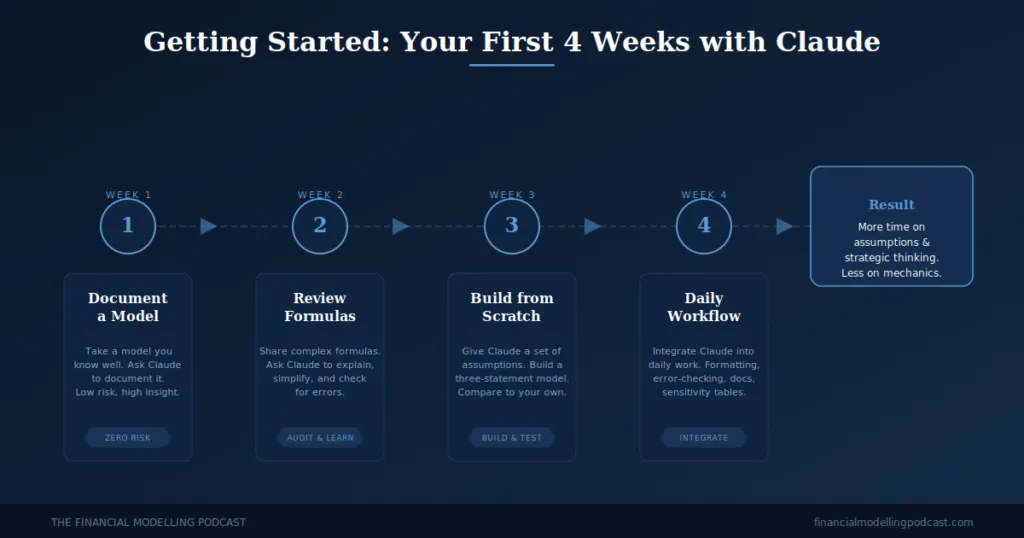
If you're new to using Claude for financial modelling, here's a practical starting point:
Start with model documentation. Take a model you know well and ask Claude to document it. This is low risk (you're not changing anything), and it shows you how Claude understands workbook structure.
Then move to formula review. Share a complex formula and ask Claude to explain it, simplify it, or check it for errors. You'll quickly get a feel for what it handles well and where you need to stay hands on.
Try building a simple model from scratch. Give Claude a set of assumptions and ask it to build a three statement model. Compare its output to how you'd build it yourself.
Use it for the tasks that eat your time but don't require deep thinking, such as formatting, documentation, error checking, sensitivity table construction etc.
The Bigger Picture
The financial modelling profession isn't going away. If anything, the ability to build, audit, and interpret financial models is becoming more valuable as AI makes it easier to produce them. The modellers who thrive will be the ones who use tools like Claude to handle the mechanical work while they focus on the assumptions, the commercial logic, and the story the numbers tell.
Claude in Excel is available in beta for Pro, Max, Team, and Enterprise users. You can find it in the Excel add-ins menu.