
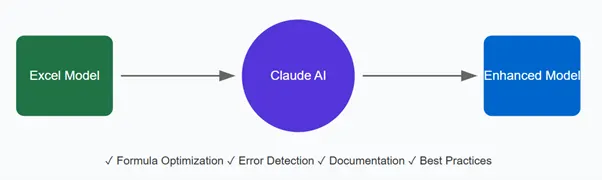
As financial modellers, we're always looking for ways to streamline our workflow and reduce errors in our models. Enter Claude, an AI assistant that's proving to be a game-changer for Excel-based financial modelling. Here's how you can leverage this powerful tool to enhance your modelling practice.
Model Building and Validation
One of Claude's most valuable capabilities is its ability to review complex Excel formulas and model structures. It can spot potential circular references, identify hardcoded values that should be variables, and suggest ways to make your models more robust. For instance, if you're building a DCF model, you can ask Claude to review your free cash flow calculations or help structure your sensitivity analysis tables.
- Consider this scenario: You're working on a complex LBO model and want to ensure your debt scheduling is properly structured. Simply share your formulas with Claude, and it can help you:
Verify the mathematical logic of your calculations - Suggest more efficient formula structures
- Identify potential issues in your waterfall calculations
- Recommend best practices for handling debt amortization
Formula Optimization
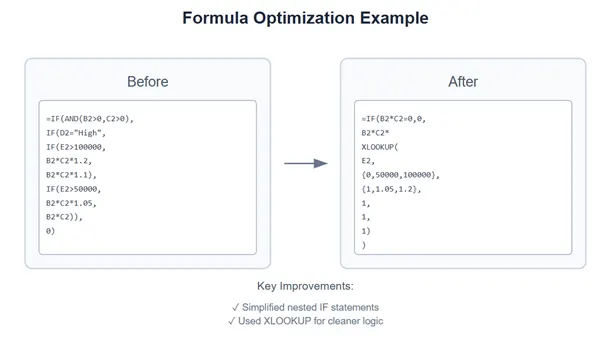
Many financial models suffer from unnecessarily complex formulas that are difficult to audit. Claude excels at simplifying and optimizing Excel formulas while maintaining their functionality. For example, it can help transform nested IF statements into more elegant solutions using INDEX-MATCH or XLOOKUP, making your models more maintainable and easier to debug.
Documentation and Comments
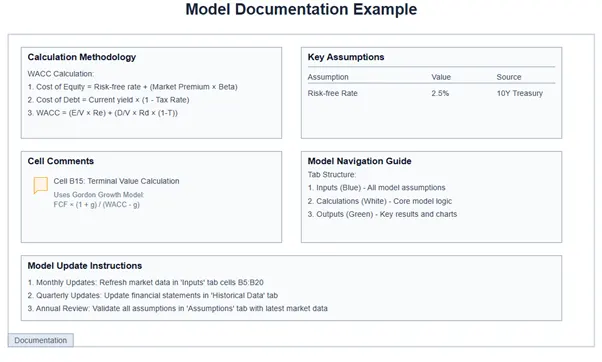
Clear documentation is crucial for model handover, but it's often overlooked due to time constraints. Claude can help generate comprehensive documentation for your models, including:
- Detailed explanations of calculation methodologies
- Assumptions and their sources
- Cell-level comments explaining complex formulas
- User guides for model navigation and updates
Model Testing and Debugging
When your model isn't behaving as expected, Claude can help you implement systematic testing approaches. It can suggest test cases for different scenarios and help you build checks and balances throughout your model. This is particularly valuable for complex models with multiple interconnected worksheets.
Best Practices Implementation
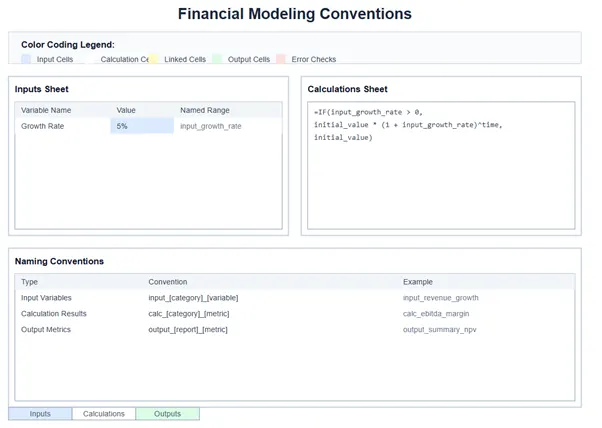
Financial modelling best practices are essential for creating reliable, professional models. Claude can guide you in implementing industry-standard conventions, such as:
- Proper colour coding for inputs, calculations, and outputs
- Consistent formula structures across worksheets
- Clear separation of inputs and calculations
- Effective naming conventions for ranges and variables
Real-World Applications
The real power of Claude becomes apparent when dealing with specific modelling challenges. For example, when building a working capital model, you might ask Claude:
"How can I make my working capital calculations more dynamic to account for seasonal variations in inventory levels?"
Claude can then provide specific formula structures and modelling approaches, complete with explanations of the underlying logic and implementation steps.
Getting Started
To begin incorporating Claude into your financial modelling workflow, start with simple tasks like formula reviews or documentation generation. As you become more comfortable with the tool, you can gradually expand its use to more complex modelling tasks.
Remember that while Claude is incredibly helpful, it should complement rather than replace your financial modelling expertise. The best results come from combining AI capabilities with human judgment and industry knowledge.